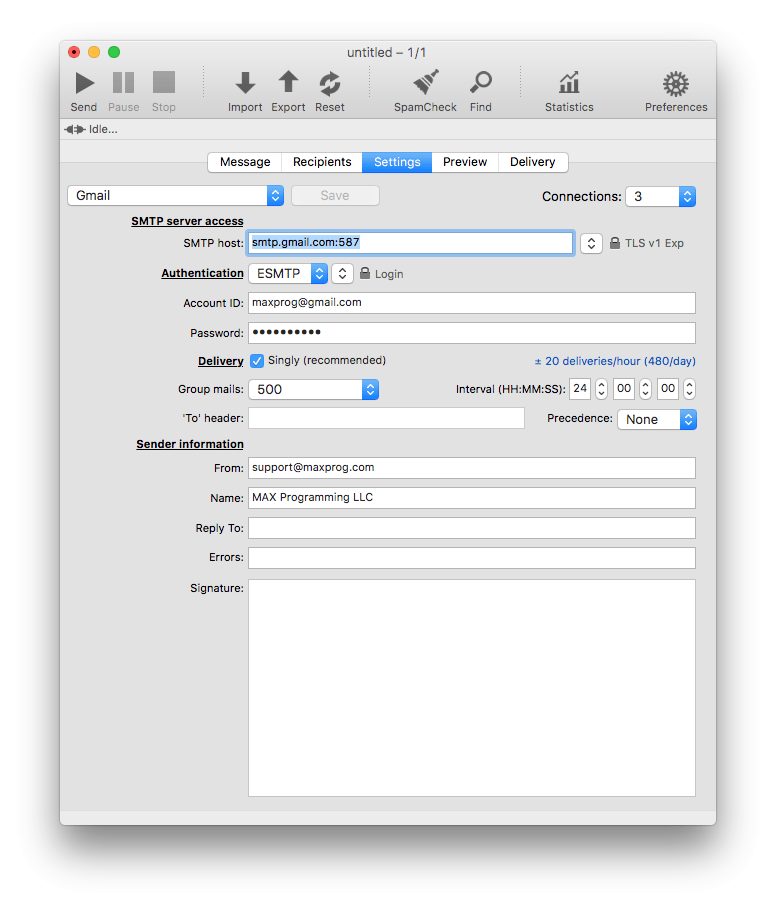
These are the GMail MaxBulk Mailer settings:
| SMTP server access |
|
SMTP Host |
smtp.gmail.com *or* smtp.gmail.com:587 |
|
Connections |
3 |
|
Security |
TLS v1 Exp |
| Authentication |
|
Authentication |
ESMTP | Login |
|
Account ID |
<your_Gmail_Screen_Name>@gmail.com |
|
Password |
<your_Gmail_password> (the one you have created here for MaxBulk Mailer) |
| Delivery |
|
Delivery |
Singly |
|
Group mails |
50 |
|
Interval |
00:06:00 |
| Sender information |
|
From |
<your_userID_here>@gmail.com |
|
Name |
<your_display_name_here> |
If you get a 534-5.7.14 error saying that you have to 'log in via your web browser' just visit this page and turn off the double security option or create a password for MaxBulk Mailer as explained here.
Note that Gmail has several delivery limits: 500 messages can be sent each day to a total of 500 recipients with up to 500 recipients per message in bulk mode. More information here and here.
Always double check email addresses of recipients (with eMail Verifier) before hitting the Send button. That’s because your account will get disabled if the email message contains a large number of non-existent or broken addresses (<25 ?) that bounce back on failed delivery.
As a precautionary measure to stop spam, many ISPs are no longer allowing outbound traffic on port 25. As a result, your ISP may have blocked port 25 on your account. Port 25 is the standard TCP port used to send e-mail via the SMTP protocol. Hopefully most SMTP servers offer their services through several ports. So, if MaxBulk Mailer can't connect to your server through default port 25 try to use port 587 or 2525. If the 'LOGIN' authentication scheme gives problems try 'PLAIN' from the second pull-down menu next to 'Authentication'.
Example: